IDA Pro error
The graph is too big (more than 1000 nodes)
two options as to why the graph is "too big"
1) either it's obfuscated somehow
2) or it's packed

IDA Pro error
The graph is too big (more than 1000 nodes)
two options as to why the graph is "too big"
1) either it's obfuscated somehow
2) or it's packed
https://app.any.run/tasks/ab008b3d-fe3b-44f2-bb5d-d6758f46d571
Browser Hijacker HLoginAssistant
establishes persistence in startup
hku\***\software\microsoft\windows\currentversion\run\IEXPLORE
url: search.hloginassistant.co
https://urlscan.io/result/8164cfc1-df93-4cd0-b7b9-a605d9e241f8/


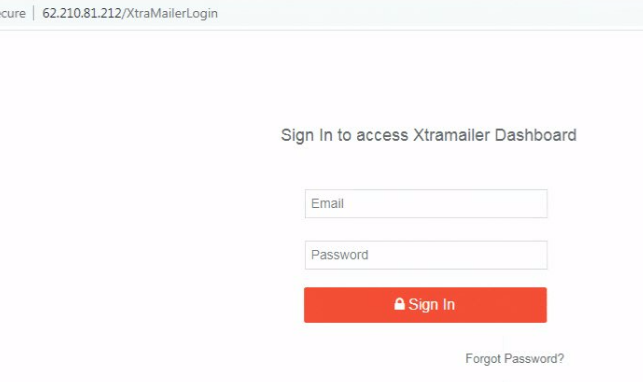

#XtraMailer spam service for credential #phishing
urlscan.io/result/9274723…
mailer login: 62.210.81[.]212/XtraMailerLogin
stolen creds posted to: 62.210.81[.].212/next.php
https://twitter.com/prodaft/status/1286580568801640448?s=46&t=CMAHRgmBZRQ-vkxgYQ9Znw
were here in the past
hxxp://conferencias.falcorp[.]net
hxxp://195.154.164[.]184
hxxp://195.154.164[.]25
htxxp://62.210.72[.]29
tool error message that shows some internal information
urlscan.io/dom/8f93bd4e-7…
/var/www/xtramailer/vendor/laravel/framework/src/Illuminate/Routing/
RouteCollection.php
Router.php
Pipeline.php
Foundation/Http/Kernel.php
/fideloper/proxy/src/TrustProxies.php
/Middleware/TransformsRequest
/CheckForMaintenanceMode.php
/var/www/xtramailer/public/index.php
some related variables to #XtraMailer spam service #phishing tool
FACEBOOK_CALLBACK_URL
FACEBOOK_CLIENT_ID
FACEBOOK_CLIENT_SECRET
FCGI_ROLE
GOOGLE_APPLICATION_CREDENTIALS
MAIL_PASSWORD
MAIL_USERNAME
PUSHER_APP_ID
PUSHER_APP_KEY
PUSHER_APP_SECRET
RMQ_PASSWORD
RMQ_USER

Related Social Media Posts
@500mk500
https://twitter.com/500mk500/status/1586505814839558145?s=20&t=e_pnOL_iyOz5x_fGUE5RpQ
Mega Super Autouploader
https://github.com/stamparm/maltrail/commit/7fca81e41937db476b1ddec47a7f01d1152355d6
Notes just for me learning
CPPEH_RECORD = exception handling
__guard_check_icall_fptr = control flow guard
_initterm = creation function pointer table
You've probably heard it mentioned that one of the first steps in Cybersecurity is Asset Inventory. I can tell you first hand this is so true. How can you protect things if you don't know what you have? Sadly, at everywhere I've worked, and I think this is a struggle everywhere, it's been a challenge just knowing what you have. I'm not just speaking about Workstation, Server, or user names. Another example would be Software titles, Publishers, and executable names.
I wanted to share with you something I've been doing, as a "Threat Hunter". You may think it's interesting to take a list of IOCs (indicators of compromise) like malicious IPs, file hashes, file names, urls, or domains and hunt for them on your network. If you think it's targeted and relevant IOCs, that's not a bad idea, but the odds of you getting a hit are low. Threat actors are very skilled nowadays and have simple ways to generate brand new IPs, domains, urls, file names, and file hashes per target, per victim, and even per user.
Another more advanced and potentially good threat hunt would be to find a tactic/technique that a threat actor may use, like certain parameters being passed to an executable, certain port and protocol traffic on your network, certain file extensions in emails, etc. This is cool and could be worthwhile, but is also like finding a needle in a haystack. The MITRE att&ck matrix hads 100s of techniques, and there are so many variations of each technique that a threat actor has the advantage. If they tweak their method every so slightly, your search may find nothing.
So, what's an even better method? Here I go back to asset inventory. Knowing what you have in your environment. At my current work I have massive lists built over the years of various things ...
Hopefully you get the picture. Massive lists of things I've done at least some level of vetting on, even if it's 30 seconds with a google search, to have some comfort level that it's probably normal or expected. I have experience doing this for perhaps 15,000 or more systems and yet I'm able to build these lists and believe me, it wasn't as hard as I expected. Now of course, if you work at a larger organization than that this could get significantly more challenging. But if you're at a smaller business, I can honestly say I think it's do-able.
So, why do I have all these lists? I think in many ways, this is my best approach or chance for finding malicious activity. This is my best approach I've found so far for threat hunting. Instead of looking for malicious IOCs that have a short life and become useless quickly, instead of searching for odd tactics and techniques that may or may not have been used by my threat actors, I look for stuff that I've never seen before in our environment.
Imagine the following
It's my belief that this is a great way to find anomalies and potentially malicious activity.
A threat actor can change their IOC, a threat actor can change their technique, but in the overall big picture it's going to be hard for a threat actor to generate ONLY program names, urls, domains, IPs, scheduled tasks, or windows services that have already been seen.
The odds are more likely that the threat actor will generate a few program names, urls, domains, ips, scheduled tasks, or windows services that have never been seen before at my work ... and hopefully those show up on my hunt because they don't exist in my list yet ... and hopefully I can identify that they are malicious before the threat actor does anything deterimental.
Hermetic Wiper "View Certificate" for your AppLocker publisher blocking pleasures
CN = Hermetica Digital Ltd
O = Hermetica Digital Ltd
L = Nicosia
C = CY

