Monday, January 1, 2024

#DailyThreatHunt Challenge

 1/1/2024 marks the start of the #DailyThreatHunt challenge!  I challenge everyone to post their unique #threathunt ideas to the world. Help the #blueteam fight the good fight by helping those orgs that don't know where to start.  Make threat hunting the new norm.


-------------


1/1/2024 Idea:🧐EDR cloud logins.


Hunt: 

Find your EDR/XDR cloud console auth logs (S1, Crowdstrike, etc.). Who's logging in & from where? Are they expected? Record what you find.  After a period of time, do the hunt again. Did anything change?

-------------


1/1/2024

 0str1chS3c

@ostrich_sec


Replying to 

@neonprimetime

Baseline network traffic via firewall logs or some type of IDS/IPS source. Gain an understanding of what is going in and out of the network. Great way to find evil, as malware has to beacon somehow.

-------------

1/2/2024 Idea:🧐Termination process


Hunt:  

Pick a week of old terminations in ticketing system from perhaps last month.  Focus on non-standard accounts like admin accounts (e.g. JDoeAdmin), non-AD linked accounts, cloud accounts, etc.  Look in your SIEM & the source systems to see if any of those accounts are still enabled or have been used recently.  Is your termination process even working?

-------------

1/3/2024 Idea:🧐 Internet Facing Systems  


Hunt:  

Inventory your internet facing websites. Using a web browser, connect to each from off-network (record what your IP address is) and attempt a login (even if you don't have access to any of them).  Use a unique username that nobody else will try so it's easy to search. Then open up your SIEM, search for each of those login failures, and validate if you're actually even getting logs from those internet facing websites.  You should have firewall logs, web access logs, and authentication logs at a minimum for each.

-------------

1/4/2024 Idea:🧐 Website Crawl


Hunt:

Pick site, list pages in logs recently viewed (200 success). Visit pages in browser. Any files in odd folder? webshell? unpatched plugin? data leak? access control issue? Run on another day, did new pages appear?

-------------

1/5/2024 Idea:🧐 Local Account Enumeration 


Hunt: 

Most authenticated vulnerability scanners can enumerate local accounts or admin. Export the results for your org.  Ensure they're expected.  Save results, re-run in future, diff & see what's new.


-------------

1/6/2024 :🧐

Software Supply Chain Compromise 


Hunt:  

Pick a critical application. Find all executables associated.  Find all Network connections or DNS requests those executables made.  Validate each EXE, DNS, and IP address is legitimate.  Hunt the same thing again in future, looking for any new executables, IPs, or DNS requests that weren't there before.  Think Solarwinds & CCleaner compromises. You're looking for a C2 connection or a new payload delivered from within a legitimate app

-------------


1/7/2024 #DailyThreatHunt #threathunt #blueteam

Idea:🧐

Subnet inventory 


Hunt:  

Pick a subnet such as a /24. IoT/OT are always fun. Validate and document each device using access control logs, firewall traffic, dns lookups, & ticketing system. Use a web browser or ssh client for example if you are able to connect to these devices as well to see consoles and banners. Looking for rogue devices or odd traffic.


—————-

1/8/2024 #DailyThreatHunt #threathunt #blueteam

Idea:🧐

Process Baseline 


Hunt:  

Pick a newly built pc. Use 4688 events or sysmon process create,  list all EXE file names run in logs. Validate their legitimacy. Now run against some older pcs looking for any EXE on old but not on new pc.

-----------------

1/9/2024 Idea:🧐

Large Outbound


Hunt:   

Use netflows or proxy logs to group outbound traffic by source, find top 10 endpoints sending traffic out in bytes. Validate the destinations. Use endpoint logs to figure out what app is uploading this data.


-----------

1/10/2024 Idea:🧐 Hardware Vendor Inventory


Hunt:    

Select all MAC OUIs from your NAC logs. Group by # of devices for each OUI, focus on the rare ones that only show up once or twice.  Validate those devices using your ticketing system, dns and firewall logs leaving that system, etc.  You might find a rogue device, personal device, or other device that shouldn't really be there on your network.  Save this list so you can check it again and see what new systems appear next week.


———-


1/11/24 #DailyThreatHunt #threathunt #blueteam

Idea:🧐 Default Password


Hunt: 

Use vulnerability scanner OS fingerprint results to find non-standard systems like printers, cameras, etc. Navigate to them in web browser. Google default passwords and try them. Is your IT staff hardening?

---------------

1/12/24 #DailyThreatHunt #threathunt #blueteam

Idea:🧐 Unique User Agents


Hunt:  

Group proxy logs by User Agent, count source systems using them, look for User Agents being used by only 1 host.  Use endpoint logs to figure out what process or app made that connection. Is it a C2?


———-

1/13/24 #DailyThreatHunt #threathunt #blueteam

Idea:🧐 Revoked Drivers


Hunt:  

Review all Sysmon driver loaded events (ID 6) where SignatureStatus is Revoked. Any instances where a vendor’s signing cert was stolen and re-purposed for malware? At a minimum the driver should be upgraded.


——-

1/14/24 #DailyThreatHunt #threathunt #blueteam

Idea:🧐

SYSTEM Processes


Hunt:  

Pick a newly built pc. Use 4688 events or sysmon process create,  list all EXE files running as SYSTEM. Validate their legitimacy. Now run against older pcs looking for anomalous SYSTEM processes.

——

1/15/24 #DailyThreatHunt #threathunt #blueteam

Idea:🧐Cloud Storage Buckets 


Hunt:   

Search your proxy logs for common cloud domains (e.g. .s3.amazonaws.com , .blob.core.windows.net) or services like .sharepoint.com .  Any exposed data? Shadow IT? Cloud tenants you weren't aware of?


——-


1/16/24 #DailyThreatHunt #threathunt #blueteam

Idea:🧐Missed AV hits


Hunt:   

If you have antivirus deployed, do all alerts get to your SOC? Likely not. Find the ones that didn’t make it to the SOC queue, figure out what they were and where they came from.  Did something get missed?

------

1/17/24 #DailyThreatHunt #threathunt #blueteam

Idea:🧐Web Proxy Blocks 


Hunt:    

Your web proxy blocks a lot of things, but your SOC likely doesn't review them all. Find interesting blocked categories like malware, c2, pup software, etc.  Is any blocked traffic from malware on a pc?

----------

1/18/24 #DailyThreatHunt #threathunt #blueteam

Idea:🧐VPN Many Users 1 IP


Hunt:

Look at remote access VPN logins, group by source IP, any IPs have multiple users logged in?  Document these remote work buildings, 3rd party buildings, etc.  Anything unexpected? Baseline & re-run later.


———

1/19/24 #DailyThreatHunt #threathunt #blueteam

Idea:🧐3rd Party Compromise


Hunt:

Get a list of your org’s critical 3rd parties (suppliers, vendors, contractors, etc). Look them up on social media or google for ransomware  or breach notifications. Was any of your org’s data involved?


———


1/20/24 #DailyThreatHunt #threathunt #blueteam

Idea:🧐Command Line Web Requests


Hunt:

Search command lines events (any OS, from SIEM, EDR, etc) for wget, curl, Invoke-WebRequest, iwr, Invoke-RestMethod, WebClient DownloadFile, etc and baseline the URLs. Re-run later to find new ones.

----------

1/21/24 #DailyThreatHunt #threathunt #blueteam

Idea:🧐EDR Protection True-Up

Hunt:
List of all systems (from AD, CMDB, or vuln scans). List of all systems that recently checked into the EDR console. Diff & escalate those missing the EDR agent. You can't protect what you can't see!

---------
1/22/2024 #DailyThreatHunt #threathunt #blueteam
Idea:🧐Powershell Windows API calls

Hunt:
Query powershell command logs for keywords like "DllImport"/"static extern". Baseline the scripts/systems/accounts. How many apps/IT staff run scripts interacting directly w/ Windows APIs?

---------
1/23/2024 #DailyThreatHunt #threathunt #blueteam
Idea:🧐IP Lookup Baseline

Hunt:
Use endpoint logs (like sysmon DNS 22) to baseline what processes make calls to IP lookup services. Regularly re-run this, doing a diff, see what new EXEs make these calls. Confirm each one is legit.

——-
1/24/24 #DailyThreatHunt #threathunt #blueteam
Idea:🧐Remote Login Countries

Hunt:   
Use VPN and other remote access logs. Identify what countries across the globe users normally login from. Run again later looking for new countries never seen before.  

——-
1/25/24 #DailyThreatHunt #threathunt #blueteam
Idea:🧐802.1X Removal

Hunt:   
Use either router command logs or just audit the configs. Look for commands that disable 802.1X on a port or find ports that already have this disabled. Is that configuration expected?

——-
1/26/24 #DailyThreatHunt #threathunt #blueteam
Idea:🧐Service Account RDP

Hunt:   
Get a list of windows service accounts from Active Directory at your org. Use windows logs to find times they did Remptr Desktop into any systems. Is this expected? Should they be RDP’ing at all?

—-
1/27/24 #DailyThreatHunt #threathunt #blueteam
Idea:🧐Group Policy Preference Passwords

Hunt:   
Search your GPP XML plus any other .vbs, .bat, etc files in sysvol for clear text passwords still sitting in there. Report those to the owners to get cleaned up. 
—-
1/28/24 #DailyThreatHunt #threathunt #blueteam
Idea:🧐Mobile App Inventory

Hunt:   
View all discovered apps on mobile devices in MDM. Google what each is. Should they be there? Re-run later and diff for new ones. If you can’t allow list, make a non-compliant policy for certain apps.
----
1/29/24 #DailyThreatHunt #threathunt #blueteam
Idea:🧐Process Injection

Hunt:
In windows logs find where a process launches a child that is the same (e.g. svchost.exe launches svchost.exe). Document when this is normal, re-run later to find new ones. Could it be process injection?

——-
1/30/24 #DailyThreatHunt #threathunt #blueteam
Idea:🧐Security Agent Patching

Hunt:    
For EDR, AV, etc. Use sysmon process create events, agent console, or vuln scanner reports. Identify how many systems are at each agent version. Call out old agents to ensure protection capabilities.

—-
1/31/24 #DailyThreatHunt #threathunt #blueteam
Idea:🧐Office Doc Child Processes

Hunt:    
Use sysmon 1 or windows 4688 for process creates where parent is word, excel, PowerPoint. What child processes? Validate & document those odd ones so when you re-run you can focus in new things.

——
2/1/24 #DailyThreatHunt #threathunt #blueteam
Idea:🧐Browser Extension Inventory

Hunt:    
Use EDR, vulnerability scan reports, or simply enumerate the extensions folders for Chrome, Edge, Firefox, etc. Build a list of allowed ones. Re-run and diff, any new unexpected ones show up?

——
2/2/24 #DailyThreatHunt #threathunt #blueteam
Idea:🧐Rare Processes

Hunt:    
Use process create events from windows, sysmon, or your EDR to count how many pcs each process ran on. Review the processes that only ran on 1 system. Is it expected? New unapproved software? Or malware?

——
2/3/24 #DailyThreatHunt #threathunt #blueteam
Idea:🧐Non-standard hostnames

Hunt:    
Understand your org’s pc and server naming standards, then use your access control logs to search where the hostname does not match your standards. Is there any rogue devices on your network?

——
2/4/24 #DailyThreatHunt #threathunt #blueteam
Idea:🧐Windows Logins w/ Remote Source

Hunt:    
Most of your 4624 windows login events probably have RFC1918 source IPs. Hunt for when the source IP is remote. Any RDP open to the internet or any other mis-configurations?

——
2/5/24 #DailyThreatHunt #threathunt #blueteam
Idea:🧐Startup Registry Adds

Hunt:    
Review sysmon loogs (ID 12) for new startup registry entries that are autoruns. Baseline what is normally added. Re-run at later date & diff to find new entries never seen before. Malware persistence?

——
2/6/24 #DailyThreatHunt #threathunt #blueteam
Idea:🧐Software Publishers Inventory

Hunt:    
Review sysmon proc creates for code signing certificate publishers. Baseline this list. Re-run in the future looking for new ones. Any unexpected ones or rare ones on 1 or 2 pcs? Malware?

———
2/7/24 #DailyThreatHunt #threathunt #blueteam
Idea:🧐DNS Tunneling

Hunt:    
Review DNS logs, group by TLD, where string length of sub domain is very long. Group the logs per TLD, and look for a high volume of those unique long sub domains for a single TLD. Could it be DNS Tunneling?

——-
2/8/24 #DailyThreatHunt #threathunt #blueteam
Idea:🧐DNS Tunneling via TXT

Hunt:    
Review DNS logs that have TXT, group by domain and count looking ones with highest volume of TXT records. Document and validate those high volume ones are expected. Could it be a form of tunneling?

———
2/9/24 #DailyThreatHunt #threathunt #blueteam
Idea:🧐MFA Status

Hunt:    
Use the admin console of any remote access solution for your org (VPN, etc) and look for any user accounts that are not in the MFA group or have MFA disabled. Ask why
——-
2/10/24 #DailyThreatHunt #threathunt #blueteam
Idea:🧐Security Tool User Audit

Hunt:    
Check your SIEM, EDR, IPS, SOAR, Cloud Portal, Email Security, and any other security tool or systems your SOC uses. Are the active users and their roles valid? Termed staff removed?
——-
2/11/24 #DailyThreatHunt #threathunt #blueteam
Idea:🧐Shadow SaaS

Hunt:    
Search Web logs for sub- domains containing your org name (eg. yourcompany.somewhere[.]com ). Were you aware of this SaaS? Does it need a security config review? Baseline, then look for new ones in the future
——-
2/12/24 #DailyThreatHunt #threathunt #blueteam
Idea:🧐Non-Standard TLDs

Hunt:    
Use sysmon DNS events and look for non-browser processes looking up domains with unusual TLDs (eg exclude .com, .net, .org, etc). Could it be malware ?
——
2/13/24 #DailyThreatHunt #threathunt #blueteam
Idea:🧐Admin Group Review

Hunt:    
Search Active Directory for any groups with the word “Admin” in it. Enumerate all users in those groups. Do they make sense? Are non-admin accounts used in an admin group putting your org at risk?
——
2/14/24 #DailyThreatHunt #threathunt #blueteam
Idea:🧐Public Login Pages

Hunt:    
Google dork (or Shodan l) your org for login pages indexed on search engines. Did you know these sites even existed? Any unexpected or that shouldn’t be on the internet at all? (Admin consoles or IoT)

——
2/15/24 #DailyThreatHunt #threathunt #blueteam
Idea:🧐GitHub Repos

Hunt:    
Google dork or search the public GitHub.com for any repos or code linked to your organization, internal servers, apps, accounts etc. You might find a developer doing something they shouldn’t.

——-
2/16/24 #DailyThreatHunt #threathunt #blueteam
Idea:🧐Public User Profile

Hunt:    
Use Sysmon 1 process create or windows 4688 to identify any executables that run out of the public user profile (c:\users\public). Is this normal? Is this malware?
——
2/17/24 #DailyThreatHunt #threathunt #blueteam
Idea:🧐Executables with no .EXE extension

Hunt:    
Use Sysmon 1 process create or windows 4688 to identify any executables that ran that didn’t end with “.EXE” . Trace them back to their parent process. Anything unexpected?
——-
2/18/24 #DailyThreatHunt #threathunt #blueteam
Idea:🧐Passwords in Open File Shares

Hunt:    
Enumerate open file shares (use PowerShell, vuln scanner, etc). Review scripts (ps1, bat, py, etc) & app config files for clear passwords. Look for DOC/XLS/TXT too. Report exposed creds found. 
——
2/19/24 #DailyThreatHunt #threathunt #blueteam
Idea:🧐Sysinternals abuse

Hunt:    
Learn about Microsoft sysinternals & how some legit tools can be abused (psexec, procdump, bginfo, etc). Then search for instances of these in your org. Understand where you should and shouldn’t see them

——
2/20/24 #DailyThreatHunt #threathunt #blueteam
Idea:🧐Domain & Enterprise Admin logins

Hunt:    
Use 4624 events and baseline all systems your DA and EA login to. Pay attention to the source IPs and login types. Re-run in future and look for logins that are different than your baseline.

——-
2/21/24 #DailyThreatHunt #threathunt #blueteam
Idea:🧐Short User Agents

Hunt:    
Use your web proxy logs to enumerate all user agent strings leaving your org that are short in length (perhaps 20 characters or less). Figure out what app is using each. Any that are malware c2?

——
2/22/24 #DailyThreatHunt #threathunt #blueteam
Idea:🧐URLs with IP

Hunt:    
Use your web proxy logs to baseline what URL lookups you’re seeing that are by IP (not domain), eg http://9.8.7.6/ Anything that looks like malware or C2 traffic?


——-

2/23/24 #DailyThreatHunt #threathunt #blueteam
Idea:🧐URLs with Ports

Hunt:    
Use your web proxy logs to baseline what URL lookups you’re seeing that contain a port number, eg http://bad[.]com:6773/ Anything that looks like malware or C2 traffic?

——
2/24/24 #DailyThreatHunt #threathunt #blueteam
Idea:🧐Mismatching Port/Protocol

Hunt:    
Use netflow, appid, or equivalent protocol identification to find scenarios where port and protocol don’t match (e.g. SSH over port 80, HTTP over port 443, etc). Could any of these be C2 traffic?

——
2/25/24 #DailyThreatHunt #threathunt #blueteam
Idea:🧐Hardware Remote Management Baseline

Hunt:    
Using vuln scanner results or other discovery methods baseline what hardware remote management exists at your org (HP iLo, Dell iDRAC, etc). Any default passwords or unpatched firmware?

——
2/26/24 #DailyThreatHunt #threathunt #blueteam
Idea:🧐Self Service Password Resets

Hunt:    
Ensure your SSPR solution has logging enabled, the baseline those logs. Who is resetting password and from where? Any regular failed attempts? Is this activity expected? 

——-
2/27/24 #DailyThreatHunt #threathunt #blueteam
Idea:🧐Ask for an Inventory

Hunt:    
Hunting isn’t always logs queries. Sometimes it’s person-to-person contact. Ask your IT for a list of all printers or firewalls, etc. You may get a useful spreadsheet w/ devices you never knew existed!

——-
2/28/24 #DailyThreatHunt #threathunt #blueteam
Idea:🧐Password Vault Retrieval 

Hunt:    
Review who accesses passwords/secrets from your vault. Group by user and count unique secrets accessed, sort by the most. Should those users be accessing that many secrets? Validate it’s expected.

—-
2/29/24 #DailyThreatHunt #threathunt #blueteam
Idea:🧐Reply To Discrepancy

Hunt:    
Review inbound allowed emails that made it to inboxes where the sender and reply-to fields are different. Then search for outbound replies to them. Look at subject lines. Anything look like a BEC scam?

——

3/1/24 #DailyThreatHunt #threathunt #blueteam
Idea:🧐SQL default accounts

Hunt:    
Review database authentication logs for usage of default administrator accounts like SA (Microsoft) or SYS (Oracle). Is their usage expected? Do the source IPs logging in make sense? 

——
3/2/24 #DailyThreatHunt #threathunt #blueteam
Idea:🧐Lateral Movement

Hunt:    
Review auth success logs like windows 4624 logins or Linux ssh success, group by username and sort by count of systems to find which accounts have logged into the most systems. Are these logins expected?

—-
3/3/24 #DailyThreatHunt #threathunt #blueteam
Idea:🧐Service Principals w/ No Conditional Access

Hunt:    
In Azure Cloud (I’m sure similar in AWS/GCP) SPNs should have CA (some sort of rule that restricts external access). Search for SPNs & their logins where CA is not applied. 

——
3/4/24 #DailyThreatHunt #threathunt #blueteam
Idea:🧐Scheduled Task Inventory 

Hunt:    
Enumerate all scheduled tasks/cron jobs running using logs or your vuln scanner data. Focus on the command or process being run. Re-run at a later date and diff looking for new anomalies. 

——

3/5/24 #DailyThreatHunt #threathunt #blueteam
Idea:🧐Windows Service Inventory 

Hunt:    
Enumerate all Windows services running using logs or your vuln scanner data. Focus on the command or process being run. Re-run at a later date and diff looking for new anomalies. 
—-

3/6/24 #DailyThreatHunt #threathunt #blueteam
Idea:🧐Traffic from Unknown Internal Subnets

Hunt:    
Get a list of all documented/known/expected/used internal subnets/CIDRs in your environment. Run a search in your SIEM for any outbound traffic NOT sourcing from one of those networks. 

—-

3/7/24 #DailyThreatHunt #threathunt #blueteam
Idea:🧐Windows Procs in non-Windows folders

Hunt:    
List all EXE file names in your c:\windows folder (like powershell, cmd, notepad, etc) then search for Process Create events for those file names in non windows folders. Is that normal?


——

3/8/24 #DailyThreatHunt #threathunt #blueteam
Idea:🧐Network baseline on specific OUI

Hunt:    
Pick an IoT/OT or unique OUI in your environment, like printer, camera, etc. Enumerate them
all, then search firewall logs for outbound traffic and determine what each connection is. Any c2?

——

3/9/24 #DailyThreatHunt #threathunt #blueteam
Idea:🧐Lateral Movement from specific OUI

Hunt:    
Pick an IoT/OT or unique OUI in your environment, like printer, camera, etc. Enumerate them
all, then search other log sources (sysmon etc) for connections FROM them. Any lateral movement?

—-

3/10/24 #DailyThreatHunt #threathunt #blueteam
Idea:🧐Google Dork Storage Buckets

Hunt:    
Google dork Amazon and Azure storage buckets for your company’s name, domain, keywords. Can you find any mis-configured buckets of data? Any sensitive documents? 3rd parties with poor security?

——-

3/11/24 #DailyThreatHunt #threathunt #blueteam
Idea:🧐Google Search Document Classification

Hunt:    
Does your org use Document classification or tagging? If so, Google search for your company name and tags. Are there any documents indexed on Google that you were no aware of?

——-

3/12/24 #DailyThreatHunt #threathunt #blueteam
Idea:🧐Listening Ports

Hunt:    
Pick a random system, run netstat or the equivalent, enumerate all local ports that are listening. Then do a true up by listing each EXE doing the listening and ensure each process is valid and expected. 

——
3/13/24 #DailyThreatHunt #threathunt #blueteam
Idea:🧐Outbound Firewall Denies Hunt: Review your firewall logs for review outbound to the internet. Sort by volume. Use endpoint logs to match up what’s causing these denies. Is a system infected and c2 getting blocked? 

——

3/14/24 #DailyThreatHunt #threathunt #blueteam
Idea:🧐East-West Firewall Denies Hunt: Review firewall logs (endpoint firewall or network) for local to local denies. Sort by volume. Use endpoint logs to match up cause of the denies. Is a system attempts at recon or lateral movement?

—-

3/15/24 #DailyThreatHunt #threathunt #blueteam
Idea:🧐SCCM Cache Baseline Hunt: If your org uses SCCM, Use sysmon or 4688 process created to enumerate all software running out of C:\Windows\ccmcache . Save and diff in future. What is new? Anything that shouldn’t be there?

——

3/16/24 #DailyThreatHunt #threathunt #blueteam
Idea:🧐Dumped Content Hunt: Hunt sysmon or EDR file creations for out of place odd CSV/TXT/ZIP files that look like they might be dumps from AD or elsewhere (eg users.csv, accounts.txt, dump.csv, etc)

——

3/17/24 #DailyThreatHunt #threathunt #blueteam
Idea:🧐Raw GitHub Connections Hunt: Hunt sysmom dns lookups for connections from non-browsers to raw. githubusercontent. com or similar domains. Any threat actors pulling from sketchy repos like mimikatz?

——

3/18/24 #DailyThreatHunt #threathunt #blueteam Idea:🧐Software Publisher anomalies Hunt: Hunt sysmom process create events , group and sorry by publisher / company name on the EXEs. Then review looking for misspellings or odd/unique names that are rare. Could be malware?

——


3/19/24 #DailyThreatHunt #threathunt #blueteam Idea:🧐Web Folder Listing Hunt: With access to a web server , do a directory listing of all php and other files in the wwwroot or equivalent folder. Sort by date look for new ones. Any web shells? Any zip files of dumped data?

——

3/20/24 #DailyThreatHunt #threathunt #blueteam
Idea:🧐Lolbin Hunt Hunt: Pick any Lolbin/Lolbas (https://lolbas-project.github.io) study up on it a bit, then baseline it at your org. What apps, users, systems use it legitimately? Follow up with a future hunting looking for new uses.

——


3/21/24 #DailyThreatHunt #threathunt #blueteam
Idea:🧐Network Router Commands Hunt: Baseline syslog from network routers (Cisco, etc) for what commands are run the most. Follow up on a future hunt looking for uncommon commands rarely run.

—-

3/22/24 #DailyThreatHunt #threathunt #blueteam Idea:🧐Encoded Powershell Baseline Hunt: Review sysmon 1 or windows 4688 process creates for powershell with the -encoded flag. Baseline what systems, what accounts, and what parent processes launch it. Anything unusual? Malware?

——

3/23/24 #DailyThreatHunt #threathunt #blueteam Idea:🧐CMDB True-Up Hunt: Dump a list systems from a trusted source like SCCM, AD, EDR, or SIEM. Dump a list of systems from your CMDB. Any discrepancies? Figure out why. Agent gaps? Discovery gaps? Logging gaps? 

——

3/24/24 #DailyThreatHunt #threathunt #blueteam Idea:🧐Network IDS/IPS Validation Hunt: If you have multiple network IDS/IPS, perhaps one at each physical location, sure they’re probably powered on and alive, but have you validated if alerts are firing on each? Mis-configured?
—-
3/25/24 #DailyThreatHunt #threathunt #blueteam Idea:🧐Local Admin Process Baseline Hunt: What processes is your default local admin account running on your windows systems? Use 4688 or sysmon 1 events to find out. 

—-

3/26/24 #DailyThreatHunt #threathunt #blueteam
Idea:🧐Batch Script Files Hunt: Use sysmon file create events to see what batch scripts are getting created regularly. Baseline, validate their legitimacy. Look for new ones in the future.

—-

3/27/24 #DailyThreatHunt #threathunt #blueteam Idea:🧐Powershell Script Files Hunt: Use sysmon file create events to see what .ps1 powershell scripts are getting created regularly. Baseline, validate their legitimacy. Look for new ones in the future.

——

3/28/24 #DailyThreatHunt #threathunt #blueteam
Idea:🧐BitsAdmin jobs Hunt: Use the BITS-Client operational logs in windows to review jobs running. What are they doing? Are they expected? Anything malicious ?
—-
3/29/24 #DailyThreatHunt #threathunt #blueteam Idea:🧐Invoice Mailbox Baseline Hunt: Find a shared mailbox your org uses for customer invoices. Baseline all 3rd party emails (domain) to understand who your org works with. Google to see if any had past cyber incidents eg Ransomware. 

—-

3/30/24 #DailyThreatHunt #threathunt #blueteam Idea:🧐Cloud Guest Accounts Hunt: Hunt your cloud identity (such as Azure) and look for guest accounts/invites. Are these trusted 3rd parties or random Gmail accounts? Can you validate each of them? What data are they accessing?

—-


Tuesday, November 14, 2023

Detection Engineering stages of maturity: A Story

Detection Engineering stages of maturity, getting the most out of your SIEM, a story over time

The SIEM is installed and all the detections out of the box from the vendor are enabled. Terrible, low fidelity, too many alerts, you quickly realize it's unmanageable
The out of the box rules are quickly without much in-depth thought wildly tuned just for the same of making the queue quieter. This is tons of work, you start to realize you don't even understand why most of these rules even exist or what they're doing.
You slowly start deleting the out of the box rules, 1 at a time, and replacing them with your own. For each of these new detections, you build out some sort of documentation explaining why they exist for the SOC to read and understand.
It takes quite a bit of time, but eventually you've disabled all out of the box SIEM rules. They've all been replaced with custom detections you built that are very similar but now have proper documentation.
You now have a strong grasp on every detection in your SIEM because you wrote it and tuned it, and the SIEM alerts are relatively quiet compared to what they used to be. But you realize these rules are very specific to certain TTPs and that you have gaps in coverage.
You have mapped all your rules to the MITRE attack matrix. With very little thought or planning, you start grabbing Atomic Red Team tests, and using them to build detections for tactics/techniques you're lacking in.
You have tons of detections now, your coverage map is looking better because you now have detections for most tactics/techniques. But you're starting to get back into that issue of too many alerts, so you have to be more strategic about this.
The SOC is busy, but you have free time due to a strong coverage map, so you start more proactive threat hunting. You start realizing your detections are fragile & easy to bypass & you still miss stuff (e.g. if name of a process changed, the order of parameters change, etc.)
Your threat hunts keep leading you back to really basic fundamentals, like inventory. You start building massive data sets of all assets and software in your environment. (e.g. hostnames, ips, publishers, process names, etc.)
You're slowly building a better inventory than anybody in IT ever had. You dump & group this data into your SIEM in lists & occasionally use it for tuning out false positives. This definitely improves your alert fidelity and the SIEM alerts are getting quieter again.
You now regularly threat hunt & continue to see your rules are missing stuff. You need something more, so you start building baselines from your threat hunts. Key/Value pairs, such as locations a user logs in from. Accounts that login to a server. IPs it connects to. etc.
You build a first ever experimental "baseline detection". All it does is fire if it sees something that is outside the baseline, e.g. something that isn't in your list. (ex: This server is known to connect to these IPs, but it just connected to a new IP.)
It works. You start expanding this to other "baseline detections" such as alerting when: an admin account ran a new process, an VIP user logged in remotely from a new country never seen before, etc.
You are loving this idea! How can a threat actor bypass this? They probably can't. In any incident, there's always going to be a single new IP, new executable, new country, new domain, or something. But this is going to be low fidelity & noisy, how can we scale this?
Baby steps. You gather a list of crown jewels (DAs, GAs, DCs, Critical Apps, Public systems, OT gear, etc.) One at a time you build baselines around them (what process they run, domains they connect to, countries they login from, etc.) Infinite possibilities.
It's paying dividends, but it's time consuming & exhaustive as you are the primary curator of the baselines. You need a feedback loop that can get data into the baselines. You engage your SOC in a workflow that allows them to suggest baseline additions they find to you.
The process matures, trusted senior SOC staff can add things directly to baselines. Senior staff create a loop to get baseline additions from their junior staff. A machine now exists that feeds itself, a dynamic constantly expanding baseline that increases alert fidelity.
You now are able to add more and more "baseline detections" to cover the non-critical but still important systems. As you build out these baselines, you make sure to run historical hunts to gather "what is normal" and pre-fill the baselines before SOC ever sees them.
You now have a massive data lake, dare I say a TIP? But it's not full of malicious indicators. It's full of "what's normal" in your environment. It gives the SOC droves of information and correlation points to quickly identify benign false positives.
The detections that are firing are now in most cases "new things" never seen before in your environment, thus worth a review. It keeps the SOC staff engaged & interested because it's not the same old mundane detections over and over again.
Consensus is building that those old rules like atomic red team, while they have their place, aren't as valuable as these new rules. If push came to shove (perhaps due to SIEM licensing, performance) you have some flexibility & comfort in disabling those original rules.
Time progresses, the number of baseline detections grow, SOC continues to feed the baseline, and you can dive even deeper, setting more trip lines for threat actors. You can start creating baseline detections for parent processes, east-west traffic, listening ports, etc.
Journey isn't over, it continues. Mistakes have been made, time may has been wasted, but you just keep moving forward. New chapters need to be written. We'll see where this goes. Thanks for reading this, and I hope it helped somebody. #detectionengineering #blueteam #siem

Thursday, February 16, 2023

Redline Malware Malware Analysis Feb 16 2023

Started with this redline malware sample 

https://www.joesandbox.com/analysis/808971/0/html

Which the sandbox says dumps a bunch of child-processes and eventually drops these 2 payloads

AV killer

https://www.virustotal.com/gui/file/850cd190aaeebcf1505674d97f51756f325e650320eaf76785d954223a9bee38

Healer.exe

MD5 7e93bacbbc33e6652e147e7fe07572a0

SHA-1 421a7167da01c8da4dc4d5234ca3dd84e319e762


Infostealer

https://www.virustotal.com/gui/file/dc28c9d9ab3f30222ed59f3991c5981bec40604e725ece488d8599eef917a7b3 

The Infostealer looks a lot like this blog ( https://securityscorecard.com/research/detailed-analysis-redline-stealer/ )

Franchise.exe

MD5 dd0c9e110c68ce1fa5308979ef718f7b

SHA-1 473deb8069f0841d47b74b7f414dacc6f96eca78


C2: 193.233.20.13:4136


It is stored in a self extracting .CAB file (microsoft cabinet)

It unpacks itself 4 times actually before we finally see the payload.

Each time the child .CAB file is stored in a Resource named "CABINET"

Each time there is 2 .exes inside the .CAB .

Each of the repeated dumps the "RUNPROGRAM" resource launches another child .CAB extractor.


Eventually though on the last extract it's 2 .NET executables instead of X86 and .CAB extrator.


The first .NET executable is an AV killer that turns off defender, windows updates, etc.


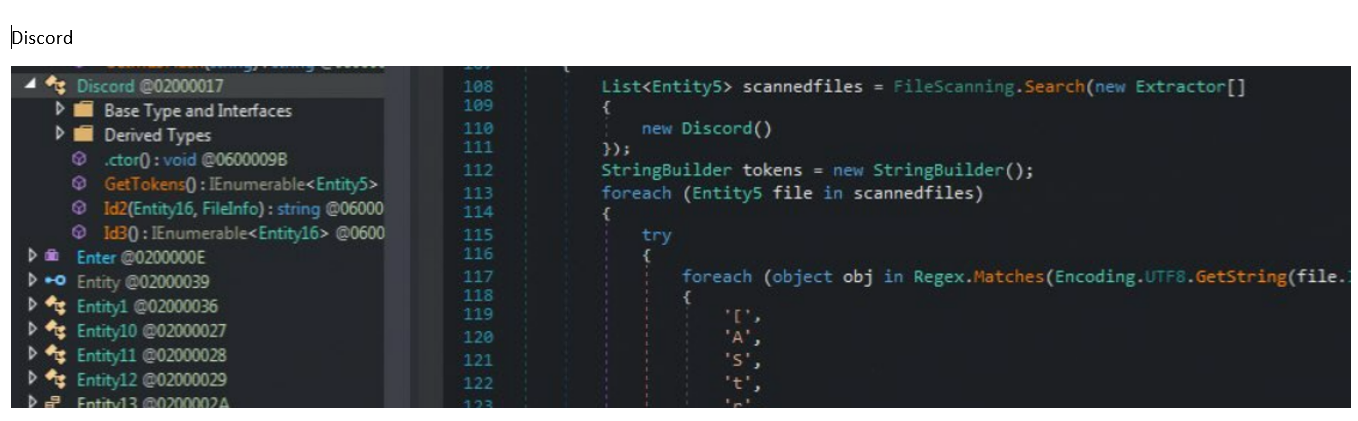
The 2nd .nET executable is the infostealer that grabs wallets, vpn , discord, and much more


There are some Russian characters and nearby region country names


There is also code for the c2 command and control traffic that is Xor'd with a key "Sigma" and base64 encoded. 193.233.20.13:4136


CAB files FDICreate FDICopy

 call ds:__imp__FDICreate (creates context for extracting Microsoft .CAB Cabinet files)

...

push offset pszCabPath 

call ds:__imp__FDICopy


You should see memory for the Cabinet (or CAB archive-file format) recognized by their first four bytes (also called their magic number) MSCF

After the FDICopy you'll see extracted files (possibly .exe malware) in the file path that was in pszCabPath

FindResourceA 0xa

 v0 = FindResourceA(0, "UPROMPT", (LPCSTR)0xA);


or


push 0xA ; lpType

push edi ; lpName

push 0 ; hModule

call ds:__imp__FindresourceA@12


This is grabbing a handle to a resource string from RCData with the name "UPROMPT" (you can see this in resource hacker)  ... please note it'll follow by using "LoadResourceA" to actually get the string value and put it into EAX

0xA = 10 = RT_RCDATA = Application-defined resource (raw data)

0 for hModule = use this current executable's resources

pointer to the resulting string is put into eax


Wednesday, February 15, 2023

Packer Process Injection - CreateProcessInternalW CREATE_SUSPENDED

CreateProcessInternalW

CreationFlags: CREATE_SUSPENDED 0x00000004


Malware creating a process in a suspended state


typically from a packer and process injection

it has unpacked code and is injecting it into a user process


will be followed with calls like 


NtGetContextThread

ReadProcessMemory

memcpy

WriteProcessMemory ('MZ')

NetSetContextThread

NtResumeThread


to edit memory of suspended process and inject the malicious code

VirtualProtectEx PAGE_EXECUTE_READWRITE

 VirtualProtectEx

Protection: PAGE_EXECUTE_READWRITE 0x40


in malware that almost always means "injected code"